
Planet pages Save
Click a body in a system's Planets list, or a moon in a body's own Moons list, to open its page in the Inspector. In a save, search finds a planet by name too.
A star's page opens with its type and size to edit, as Stars describes. Moons are listed below a planet and open their own pages the same way.
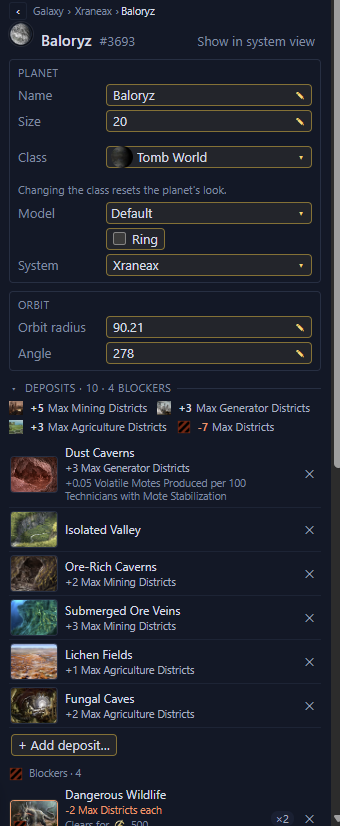
- 1Name, size and class
- 2Model and ring
- 3The system it is in
- 4Orbit radius and angle
- 5Deposits and blockers
- 6Add deposit…
Rename a planet or moon
Rename a planet or moon in its Name field. Moons named after a planet take its new name too.
Change a planet's size
Change a planet's or moon's size in its Size field. On a colony, the game demolishes districts over a lowered cap within a month.
Change a planet's look
In a Stellaris 4.x save, change a planet's or moon's look in its Model field, such as the Ocean Paradise, Earth or Previously Terraformed look. The looks the game uses on the planet's class come first. Select Default to go back to the look of the planet's class. Terraforming or any other class change in game also resets the look.
Change a planet's class
In a Stellaris 4.x save, change a planet's or moon's class in its Class field. Deposits, modifiers and any colony stay as they are. The planet takes the new class's look, and the Model field can set another. A colonised planet can only change to another habitable class with ordinary districts, such as continental, ocean or tomb world. Stars, habitats, ring worlds, arks and other special worlds keep their class.
Add or remove a ring
In a Stellaris 4.x save, a planet has a Ring checkbox to give it a ring or take its ring away. A moon only has the checkbox while it has a ring, so you can take it off.
A scenario body's page Scenario
In a scenario, a body's page shows what its initializer says about it. It has the Name, Class, Size, Ring and Model rows, each set by the initializer, rolled by the game or decided when a new game starts. Values with a dotted underline have an explanation. A line under the name says when some games don't have the body, and how many bodies like it the game places. The page also lists the deposits, modifiers, anomaly and flags the initializer states. A start planet has a "start planet" mark beside its name, and a home planet a "home planet" mark. A Stopped row lists what the initializer stops on the body, such as Blockers, Planet features or Anomaly. The Initializer section shows Script at game start, the lines the game runs for the body, and Other initializer lines. Nothing on the page can be edited yet.
Where only the class the body gets decides its model, ring, deposits or planet features, that row reads "Suits its class". Under the Deposits and Planet features rows, click What it can roll to see what the class could give. It starts closed. To see what one of the classes gives, click it in the Class row's list (See what one class rolls).
An unnamed body shows the name the game gives it, made from the system's name, such as "Yunak II" or "Yunak IIa". The game numbers planets in order. Where some bodies before it may not be placed, the name is rolled. Hover over the name to see every name it can have. Lists, links and the system view show the first name it can have, such as "Yunak II". A row of the Planets list that stands for several planets shows the names they can have, such as "Yunak II to IV". Asteroids get names the game draws at random, and their Name row reads "Random".
A rolled class lists the classes that fit the body's orbit, likeliest first. Where the orbit is a single distance and the system's star is fixed, each class has a bar and its odds, and the likeliest class's bar is the longest. A class picked from a named list of classes lists every class in the list. The game may roll any of them, even one that doesn't fit the orbit. More than four classes without odds show as a row of icons. Hover over an icon to see the class's name. Click a class to see the body as that class, and click Any to go back. A rolled ring shows its chance.
Some bodies are never placed, because none of the classes they can roll fit their orbit. They show "never placed" on their row and their page, and look faint in the system view. A moon of a planet that is never placed is never placed either. A row of several planets counts only the ones the game can place.
Some bodies are only placed in some games. Where a body can land at several distances, or the system's star is rolled, no class may fit in some of those cases, and then the game leaves the body out.
Go back
Use the breadcrumb above the page to go back. Click "‹" to go back one step, a name in it to go to that page, or "Galaxy" for the Galaxy page.
Deposits, modifiers, anomalies and archaeological sites are on Deposits and modifiers. A planet's colony is on Colonies and deleting planets.