
Troubleshooting
My edits are gone when I load the save
First check that you loaded the file you edited. If it's a cloud save, Steam Cloud may have put the original back over your edited copy. Before you play an edited cloud save, close Steam or turn off Steam Cloud for Stellaris. See Steam Cloud.
Save says the file changed on disk
The file has changed on disk since you opened or last saved it, often because Stellaris saved over it. You see this after choosing "Keep my changes" when the file changed, or when Galaxy Forge couldn't tell, as can happen on a network drive. The dialog offers three choices:
- "Save As…" saves your edits to another file and leaves the game's version alone.
- "Overwrite" saves over it. The game's newer version is kept beside it as a backup.
- "Cancel" writes nothing.
Open warns that Paint a Galaxy isn't enabled
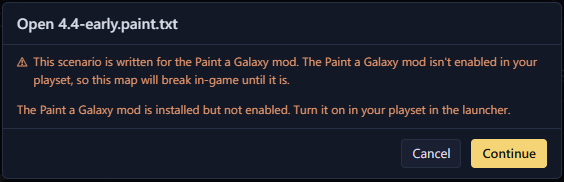
The scenario is for the Paint a Galaxy mod, and the mod isn't in your playset. Continue opens the file anyway. Before you play the map, turn the mod on in your playset in the launcher. If the mod isn't installed, subscribe to it on the Workshop first. See Export and play.
Open warns that a scenario isn't for Paint a Galaxy
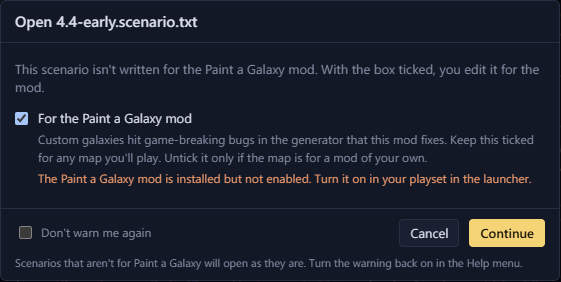
Open shows this warning when the scenario was written without Paint a Galaxy. Keep "For the Paint a Galaxy mod" ticked to edit it for the mod, which most maps need. Untick it only for a map that belongs to a mod of your own. "Don't warn me again" stops the question. "Warn on plain scenarios" in the Help menu turns it back on. See Paint a Galaxy.
Stars look plain and names look wrong
Galaxy Forge hasn't read your Stellaris install. The Game data button in the status bar says "Game data off" or "Game data unavailable". Click it, then "Load now", or "Locate Stellaris…" to pick the game's folder. See Game data and mods.
Put the original save back
Galaxy Forge keeps the file it replaces as a backup each time it saves. See Restore the original.
The Issues tab warns about something
The Issues tab lists problems on the map, errors first. The Issues page explains each one, what it does in game and how to fix it.
Report a bug
Open an issue on GitHub and attach the save or scenario if you can. That makes the problem much easier to reproduce. If you don't have a GitHub account, leave a comment on the Workshop page instead.
These help me find the problem:
- The Galaxy Forge version, from the Help menu
- The Stellaris version and your operating system
- The mods in your playset
- What you did, what you expected and what happened instead