
Prepare for a new game Scenario
A save opened as a scenario keeps most of what the old game placed, such as old capitals, origin systems, the systems events made and leviathans. Prepare for a new game sets what the new game takes from the map, row by row or from a preset.
What a save keeps as a scenario
Every system keeps its position, name and initializer, and the hyperlanes and nebulae stay. Each old capital becomes a seat. A few things change on the way:
- On a plain scenario, an old capital on one of the game's random empire starts gets an ordinary starting system, so the game builds that empire a homeworld of its own class.
- The L-Cluster is left out, because the game adds its own.
- On a plain scenario, wormhole pairs are left out. A map for Paint a Galaxy keeps them, and the mod opens them on day one.
- Gateways and L-Gates are left out, unless the system's initializer builds one again.
- On a map for Paint a Galaxy, each fallen empire's systems become a fallen empire zone at its old capital.
File → "Export as scenario…" lists what it will replace and leave out before you click Export.
Open Prepare for a new game
After "Open as scenario", the Galaxy page opens this section on its own. The Apply button stays in view at the bottom. Click "Not now" to see the whole Galaxy page instead. On any scenario, use File → "Prepare for a new game…", or select nothing and open the section on the Galaxy page. It needs game data from your Stellaris install to sort the systems into rows.
While the section is open, the map shows the galaxy as your choices would leave it.
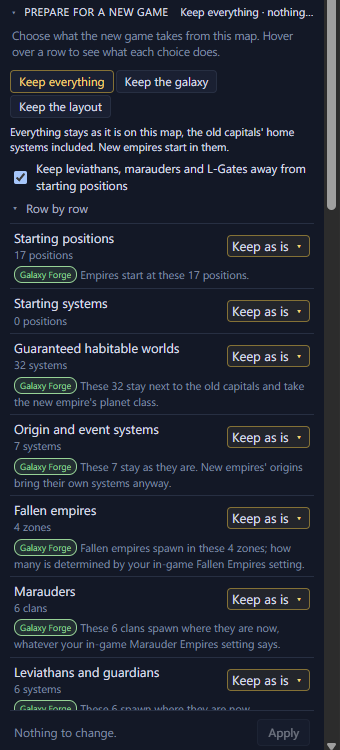
- 1The three presets
- 2Keep leviathans, marauders and L-Gates away from starting positions
- 3Row by row: one choice per kind of system
- 4Apply
Start from a preset
| Keep everything | Keep the galaxy | Keep the layout | |
|---|---|---|---|
| Starting systems | The old capitals' home systems | A random starting system at each old capital | New positions, drawn at random |
| Sol and origin systems | Kept | Normal systems | Rolled by the game |
| System names | Kept | Kept | Named by the game |
| Wormhole pairs, on a Paint a Galaxy map | Kept | Kept | Removed |
| Fallen empire zones | Kept | Kept | New zones on a Paint a Galaxy map |
- Keep everything leaves the map as it is, the old capitals' home systems included. New empires start in them.
- Keep the galaxy leaves the galaxy as it is, but every empire gets a random starting system at an old capital's position. Sol and the old origin systems become normal systems.
- Keep the layout keeps only the star positions, hyperlanes and nebulae. Galaxy Forge draws new starting positions, and on a Paint a Galaxy map new fallen empire zones. The game rolls everything else, as if this were a new random galaxy.
Choose row by row
Under "Row by row" each row has its own choice, from Starting positions to System names. Hover over a row to highlight its systems on the map and to see a card beside the Inspector. The card says what the row holds and what each choice does. Each choice has a tag for who places those things in the new game:
- Galaxy Forge: this map places them, where you see them now.
- The game: Stellaris places them when the new game starts, by the in-game galaxy setting where one applies, otherwise at random. The map can't show where.
- No one: they aren't placed at all.
The same tags show in each row's list. Under a row you've changed, one line says what that choice does.
A custom map gets no fallen empires without Paint a Galaxy, so on a plain scenario the Fallen empires row can't be changed.
New random positions and New random zones are drawn by Galaxy Forge. The map rings each new starting position and each new fallen empire zone, and a legend at its bottom left counts them. Click Reroll to draw them again.
Keep leviathans, marauders and L-Gates away from starting positions
In a random galaxy the game keeps these threats away from empires. On a custom map it doesn't, so a leviathan, a marauder clan or the L-Gate can spawn right next to a starting position.
This box is ticked by default. Every system the game would roll within 2 hyperlane jumps of a starting position becomes a normal system instead. Systems with an initializer that you keep are left as they are. The line under the box counts the systems it changes. Hover over the box to highlight them on the map.
Apply your choices
Apply makes every change as one step, and Ctrl+Z undoes it. On a scenario opened from a save, undoing Apply brings back the Galaxy page with only this section.