
Asteroid belts and the inner radius Save Scenario
A system can have asteroid belts. Its inner radius is the circle its hyperlane exits sit on. You change both on the system's page or in the system view.
Change belts on the system's page
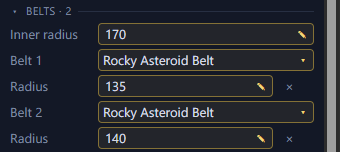
The system's page has a Belts section. You can change the inner radius and each belt's kind and radius there, or remove a belt. Removing a belt leaves its asteroids where they are. Changing a belt's radius moves its asteroids with it. The kinds come from your install, so you need the game data loaded to change one.
Change belts in the system view
In the system view, each belt and the inner radius has six small ring handles. They show when you hover over the belt or the circle. Drag any of them to change the radius. Right-click a belt's handle and select Remove belt to remove it. Its asteroids stay where they are. Right-click empty space and select Add belt here to add a belt at that distance from the star.
Belts in a scenario Scenario
In a scenario, the Belts section shows the system's inner radius and each belt's radius. Where the game rolls them, they show as ranges, such as "150 to 380". The inner radius depends on how many bodies the game places and how far out it places them. Some initializers also set an offset for the inner radius. Galaxy Forge can't tell how the game applies it, so the range shows in grey as unknown. Hover over it to see the offset. The radii can't be edited yet.