
Undo and the Changes tab
Undo and redo are in the Edit menu, and on the keys below.
Undo an edit
Press Ctrl+Z to undo and Ctrl+Y to redo. A new edit after an undo clears what you could have redone.
Go back to an earlier point
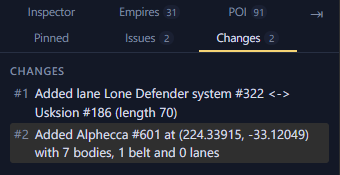
The Changes tab lists every edit since you opened the file. Click an edit to go back to just after it. That edit stays, and every edit below it is undone and greyed out. Click a greyed edit to redo up to it. To undo the first edit too, press Ctrl+Z.
Undo after saving
Saving keeps the list, so you can still undo edits you have saved. Save again to write the undo to the file. Closing the file clears the list, and a file you open again starts with none.