
Arrange planets and moons Save
In the system view you can drag bodies to new orbits and add planets and moons. To take one out, see Delete a planet or moon.
Move planets and moons
In a save, you can move planets, moons and asteroids. In a binary or trinary system you can move the stars too, and their planets move with them. A star at the system's centre stays where it is. Ring world segments stay where they are too, and can't have moons.
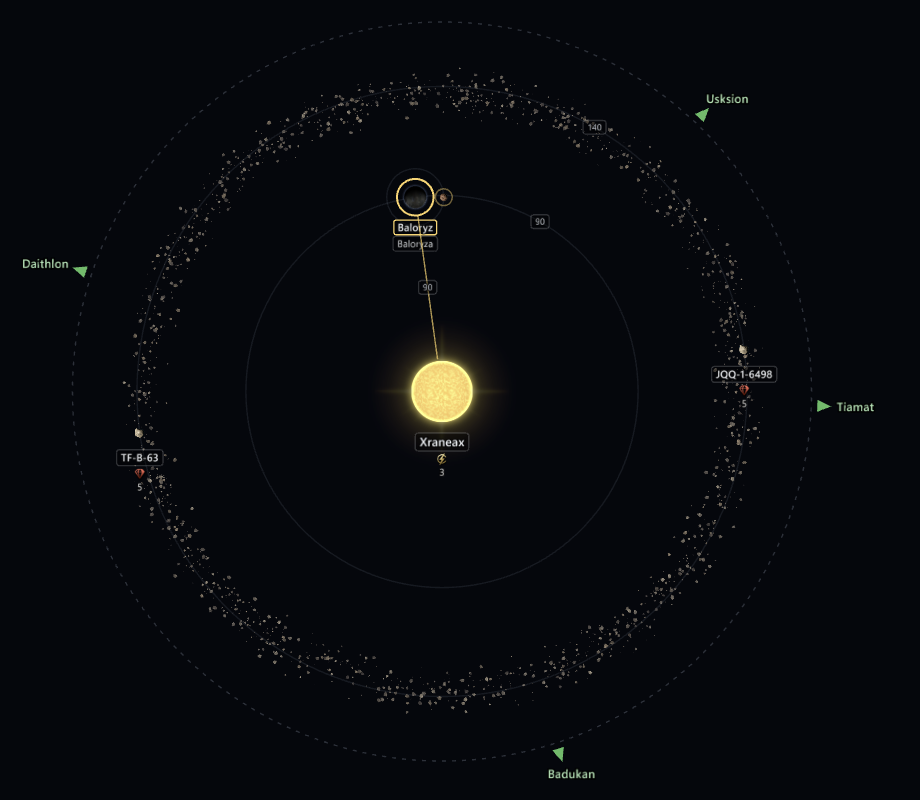
Drag a body to move it. Its distance and its angle both follow the pointer, in whole units and whole degrees. Near another orbit, it snaps to that orbit. Hold Shift to snap the angle to 15° steps. Hold Ctrl to change only one of them: drag along the orbit to change the angle, or across orbits to change the distance. While Ctrl is held, the body stays with what it orbits. Its moons move with it. Press Esc during a drag to put it back.
Mining and research stations, an Orbital Ring and fleets parked at the body move with it, and so do the stations of its moons. A megastructure built at it, such as an Arc Furnace, moves with it too. Fleets on their way to or from the body are not moved.
Make a planet a moon, or a moon a planet
Drop a planet on another planet to make it a moon of that planet. Drag a moon away from its planet to make it a planet again. A planet that has moons of its own can't become a moon. A moon keeps its name after it moves to another planet, so Sol IIIa can end up orbiting Sol IV.
In a binary or trinary system, drop a planet on another star to make it orbit that star. Its moons come with it. It lands where you drop it, clear of the star, and on one of the star's orbits when it's near one. To bring it back, drop it on the star at the centre or drag it well away from its star.
Lock a body to what it orbits
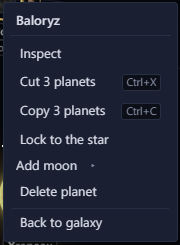
To move a body without it becoming a moon or leaving what it orbits, right-click it and select Lock to, followed by what it orbits. A locked body shows a small lock. You can still drag it along its orbit and out or in, but it stays with its planet or star. Select Unlock on the same menu to let it go. The lock only lasts while the save is open and isn't saved in the file.
Move a body with the keyboard or by number
Shift+arrow moves the body whose page is open. Left and Right move it along its orbit, and Up and Down move it out and in. Each press moves it 1° or 1 unit. Ctrl+Shift+arrow moves it 10° or 10 units. The arrows on their own still pan the view.
You can make the same edits in the Orbit block on the body's page.
- Orbits picks the star at the centre, another star or a planet. A new moon goes on the next free moon orbit of its planet. A planet moved to another star goes just past that star's outermost planet. A body moved to the star at the centre stays where it is.
- Orbit radius is its distance from what it orbits.
- Angle is where it stands on that orbit, in degrees. A moon's radius and angle are measured from its planet.
The system's inner radius is the circle the hyperlane exits sit on. If you move a planet or a belt near or past it, the inner radius moves out with it. How far out follows the defines in your install and mods.
Add planets and moons
In a Stellaris 4.x save, right-click empty space in the system view and select Add planet here. Select Random, or a planet class from the list. Each class shows the sizes it comes in. The planet goes where you right-clicked.
To add a moon, right-click a planet and select Add moon. The moon goes on the next free moon orbit of its planet.
Galaxy Forge rolls the rest by the game's rules, read from your install. Random picks a class that suits the orbit, the size comes from the class's range, and the body gets the deposits a new body would. The new body is selected and its page opens, so you can change its name, size and deposits there. Adding it is one edit, so one undo takes it away.
- A new planet takes the numeral after the system's highest, so a planet added to Meissa after Meissa IV is Meissa V. A moon takes the letter after its planet's moons, so the first moon of Meissa IV is Meissa IV a.
- Stars, moons and asteroids can't be given a moon.
- Adding a planet or moon needs game data loaded.
- If a new planet or moon sits past the system's inner radius, the inner radius moves out with it, as it does when you move a planet there.
- The new body starts unsurveyed. The game fills in the rest when you load the save.