
Issues Save Scenario
The Issues tab lists problems with the map, errors first. I opens it.
Read the Issues tab
Errors are broken data the game can't be expected to cope with, such as a hyperlane written at only one end. Warnings are worth a look, such as a system with no hyperlanes, which you may have meant. Click an issue to jump to it.
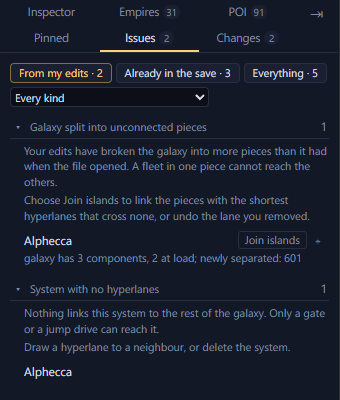
- 1From my edits, Already in the file, Everything
- 2Show one kind of issue
- 3An issue: what it means, what to do, and the systems it affects
- 4A fix button
The sections below explain each issue by the name the tab gives it, what it does in game and how to fix it. They are grouped by what the issue is about.
Hyperlanes
Hyperlane written at one end only
Stellaris writes a hyperlane into both of the systems it joins. Only one end of this one is written. Cut the lane and draw it again, which writes both ends.
Hyperlane to a system that is not here
The lane leads to a system the file does not contain, so the map cannot draw it. The editor cannot cut this one lane. Right-click the system and select Isolate, which clears every hyperlane it has, then draw the good ones again.
Hyperlane from a system to itself
The system is joined to itself. The map draws nothing for it. Open the system and cut the lane to itself from its Hyperlanes list.
The same hyperlane written twice
The file lists this hyperlane twice. Stellaris also writes these duplicates in its own saves, and they do no harm. No action is needed. Deleting the lane removes both copies.
System with no hyperlanes
Nothing links this system to the rest of the galaxy. Fleets can reach it only through a bypass, such as a wormhole or a gateway, or with a jump drive. Draw a hyperlane to a neighbour, or leave it if you meant it. In a scenario, or for a system you added since you opened the save, you can also delete the system.
Galaxy split into unconnected pieces
Your edits have broken the galaxy into more pieces than it had when the file opened. A fleet in one piece cannot reach the others. Click Join islands to reconnect the pieces with the shortest hyperlanes that don't cross any others. Or undo the edit that split them.
Positions and space
System far outside the galaxy edge
The system stands more than half again the galaxy's radius out, further than the editor adds a new system. Leave it if you meant it, or drag it in towards the galaxy edge.
Positions shifted before the game reads them
This scenario shifts every position before the game places its systems. The map draws the positions as the file writes them, so the galaxy in game will be somewhere else. No action is needed. Start a game on this map to see where the systems end up.
Position written as a range
The position here is written as a range, and the generator picks a point inside it every time it builds the galaxy. The map draws the middle. No action is needed. Moving the system pins it to one point.
Nebula list does not match the map
The save lists each nebula's systems separately from where those systems lie. Here the two disagree. Move the system or change the nebula's radius until the two agree. The list itself cannot be edited here.
System in the L-Cluster's space
When it generates the galaxy the game keeps a patch of space for the L-Cluster, and this system is in it. The map draws that patch as a circle. Move the system clear of the circle if you want the L-Cluster left to itself.
Scenario export
Wormholes and gates left behind
The export couldn't write some of the save's bypasses into the scenario.
- A plain scenario has no way to say where a wormhole goes, so the export drops every wormhole pair. On a map for Paint a Galaxy the export keeps them, and the mod opens them on day one. The export drops only a pair with an end in a system it left out.
- Gateways and L-Gates are dropped unless the system's initializer builds them again.
You can't put the dropped ones back as they were. On a map for Paint a Galaxy you can link new wormhole pairs. Otherwise the game places its own, as the galaxy settings decide.
Seat on a start written for one empire
This seat is on a starting system written for one named empire. The generator offers that start to no other empire, so the seat fits only the one that began there. Select the system and pick a generic start with Choose… in the Inspector's Initializer section. The Paint a Galaxy export does this for you.
Scenario settings
Galaxy settings do not match the map
This file's settings and the map disagree on how many empires, fallen empires or marauders there are. The new game screen will offer numbers the map cannot seat. Click Update counts.
Another file in the mod uses this name
Two files in the mod are listed under the same name. The game shows one galaxy size per name, so one of them never reaches the new game screen. Change the name in the galaxy Inspector's Scenario header, or rename the other file.
Far more systems than the largest galaxy
The scenario has many more systems than the biggest galaxy size the game and your mods offer. A galaxy this large may slow the game, especially later in the campaign. No action is needed if the game runs well for you. Otherwise remove some systems.
Initializer used more often than the game allows
The game limits how many systems may use this initializer. Systems past the limit may not get what the initializer puts there, or the game may place it only once. Give the extra systems another initializer.
Fallen empires
System in a fallen empire's space
A system is inside the ring where Paint a Galaxy builds this fallen empire. The mod needs that ring clear. Move the system clear of the ring, or fit the zones again.
Two fallen empire zones overlap
Two zones' rings cover the same space, and the mod cannot build two fallen empires there. Move one of the zones, or fit the zones again.
Fallen empire zone off the edge of the map
The zone's centre lies off the canvas Paint a Galaxy paints on. The mod has nowhere to build the fallen empire. Move the zone's system further in, or fit the zones again.
No fallen empire zones on the map
Paint a Galaxy builds fallen empires only in a fallen empire zone. This map has none, so a game started on it gets no fallen empires, whatever the game setup asks for. Click Fit zones… to add some.
Fallen empire with no way in
This zone takes hand-picked connections and no system links to it. The fallen empire gets no hyperlane, so it starts cut off from the galaxy. Click Use nearest systems to link the systems around it.
Link to a fallen empire that is not there
This system is set to connect to a fallen empire zone, and no zone claims that connection. Click Unlink to drop the connection.
Two fallen empires share a connection
Both zones take the same connection, so every system linked to it joins both fallen empires. Open one of the zones and give it a connection of its own.
Long link to a fallen empire
The link to this fallen empire zone reaches from further off than Paint a Galaxy's own rule allows. The mod adds the hyperlane anyway. No action is needed. Link a nearer system if you want a shorter lane.
Spawn points
Two seats reserved for the same empire
A reservation keeps a seat for the one empire that has its trait. More than one seat here is reserved for the same empire, and it can only start on one. Open a seat's Spawn point section and give it a different reservation.
More than one seat weighted for the player
You can start on only one of these seats, and you can't choose which. It comes down to the order the game places empires in. Clear Weighted for its empire on the seats that are not yours.
Reserved seats need another mod
A seat reserved for one empire only works with the Reserved Spawns submod. That submod is not in your playset, so these seats are filled at random. Click Subscribe ↗, then enable the mod in your playset.
Systems near a seat left for the game to fill
These systems are within 2 hyperlane jumps of a seat and have no initializer. The game fills them at random when a new game starts, so they may get a leviathan, a marauder home, an L-Gate or voidworms right next to a starting empire. Give them an initializer, or apply Prepare for a new game with Keep leviathans, marauders and L-Gates away from starting positions ticked. It turns them into normal systems.
Marauders
One marauder clan with two homes
A marauder clan has one home, and more than one system here claims to be the same clan's. The clan spawns from only one of them. Give the others a different clan's home, or an ordinary start.
Outpost with no clan home beside it
An outpost only works with a hyperlane to its clan's home. This one has none, so nothing spawns there. Draw a hyperlane from the outpost to its clan's home.
Marauder clan short of outposts
A marauder clan is a home with two outposts, each joined to it by a hyperlane. This home has fewer. Click Add the outposts to complete the clan.
- With no outposts, the tab shows a warning. On a plain scenario nothing adds them. On a map for Paint a Galaxy the mod adds both on day one.
- With one outpost, the tab shows it as information. The clan still works, and nothing adds the second.
Marauder clan beside an empire seat
This clan's home is close to an empire seat. Whoever starts there takes the raids first. No action is needed. Move the home away from the seat if you would rather the raids were spread.
Planets
Two bodies in the same place
Two planets or moons share an orbit and an angle, so the game draws one on top of the other. Open the system view and drag one along its orbit, or type a new angle on its planet page.