
Edit several planets at once Save
In a Stellaris 4.x save, select planets in the system view with Ctrl- or Shift-click. The Inspector lists them. Below the list, the planet page's fields change all of them at once.
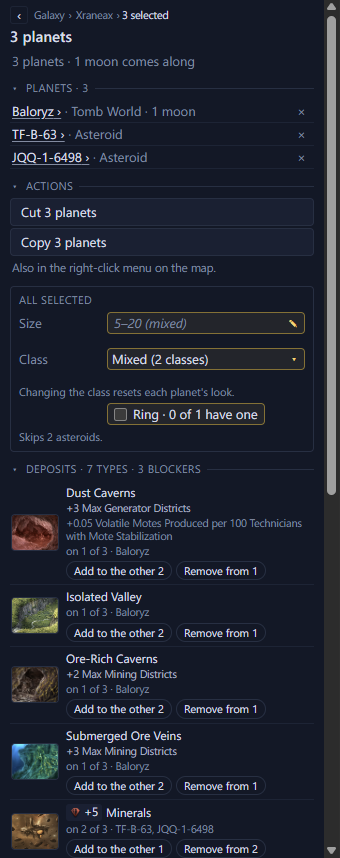
- 1The selected planets
- 2Cut or copy them all
- 3Fields that change every selected planet
- 4Deposits, with Add to the other and Remove from
Change their size, class or ring
- Size shows the size they share, or their range in grey. Type a size and press Enter to give it to every selected body. The star takes it too.
- Class lists only the classes every selected planet can take. Colonies and moons have fewer classes to pick from, and a warning under the field names the planets that make the list shorter.
- Ring is ticked when every planet has a ring and partly ticked when some do. Click it to give a ring to the rest, and again to take every ring away. Stars, asteroids, ring world segments and moons without a ring are left out.
Change their deposits and modifiers
Deposits and Modifiers list one row for each type any selected planet has, and say which planets have it. Add to the other N gives it to the planets without it. Remove from N removes one from each planet that has it. Add deposit, Add blocker and Add modifier work as on a planet's page, for every selected planet. A star takes deposits but no modifiers.
Skipped bodies and undo
A line under each field names the bodies it leaves out. Hover over it to see why each one is left out.
Each change is one edit, so one undo puts every planet back. A line under the section says what the last change did and which planets it skipped.