
System heights Save
In a save, each system can sit above or below the galaxy plane. The game shows a raised star with a line down to the plane, and its hyperlanes follow it. Stars start flat, at 0.
Set a system's height
A system's Overview tab has a Height slider under Position. The map shows the new height as you drag. The edit is made when you let go of the slider. Click Flat to put the height back to 0.
Change several systems at once
With several systems selected, the Inspector shows a strip of their heights. The Height block in its Position section changes them all: pick Set to, Raise by or Lower by, type a value and click Apply. Flatten puts them back at 0.
Shape heights with the Height brush
The Height brush (H) on the tool strip has four modes. Set gives everything under the brush one height. Raise lifts the middle most and the edge least, and Alt lowers instead. Smooth evens out the systems under it. Ripple raises and lowers systems in rings around the spot where you let go of the mouse button, and Alt swaps the raised and lowered rings. The Ripples, Waves, Dome and Crater presets are a starting point, and the graph shows the shape before you click.


See the heights
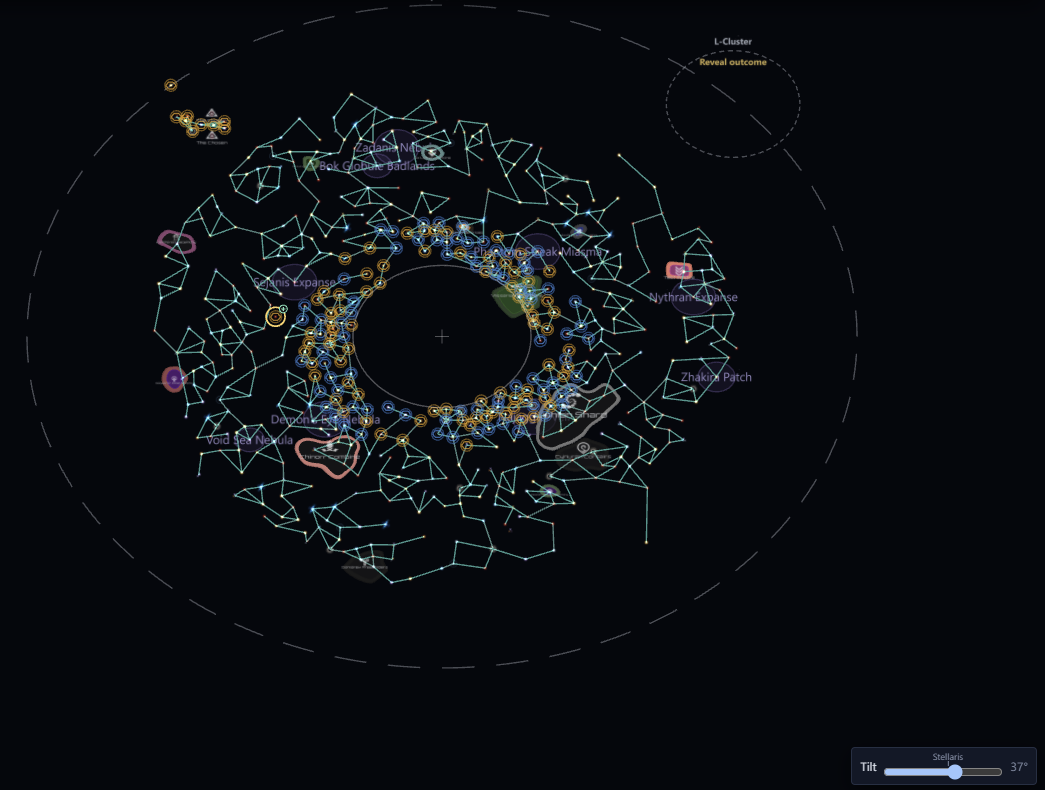
The Heights layer is on by default. A star above the galaxy plane has an amber ring, and a star below it has a blue ring. A star at height 0 has no ring.
The Tilt slider at the bottom right tilts the map so you can see the heights. The Stellaris mark is the game's own camera angle. Double-click the slider to lay the map flat. Everything works while tilted, including moving systems and editing lanes.
Heights in a scenario
Scenarios have no heights. The game ignores a height in a scenario, so these tools are hidden there.