
Layers Save Scenario
Layers decide what the map shows. The Layers menu in the top bar lists every layer. Select "Reset to defaults" at the bottom of the menu to put every layer back to how it started.
Switch the main layers
The number keys 1 to 9 switch the main map layers.
| Key | Layer |
|---|---|
| 1 | Hyperlanes |
| 2 | Systems |
| 3 | Names |
| 4 | System details |
| 5 | Empires |
| 6 | Bypasses |
| 7 | Points of interest |
| 8 | Nebulae |
| 9 | Issue highlights |
See where precursors can turn up Save
Turn on Precursors in the Layers menu to see where each precursor's anomalies can turn up in a save. Anomalies appear when a science ship surveys a planet, so the layer shows the systems that can have them, not the planets that will. Each precursor has its own ring colour. A system in two precursors' regions shows a split ring, and a system in none has a thin grey ring. The menu lists every precursor with its number of systems. Click a precursor's row to hide or show its rings. The layer needs game data from your Stellaris install.
Every layer
The menu lists the layers in three groups. A layer only shows in the menu when the open file can have it.
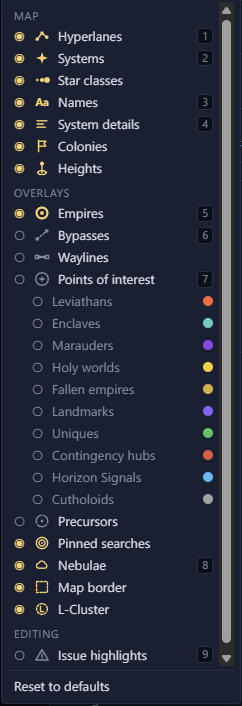
Map
| Layer | Shows |
|---|---|
| Hyperlanes | The lanes between systems. |
| Systems | The stars. |
| Star classes | Each star with the icon of its class, such as a pulsar or a black hole. With it off, every star has the same icon. |
| Names | System names. |
| System details | The icons, resources, habitable planets and fleets under each system when you zoom in. |
| Orbit radii | The radius of each orbit, in a system view only. |
| Megastructures and starbases | Each megastructure and starbase as its model from the game, in a system view only. |
| Colonies | The owner's flag and colour on a colony's name. |
| Heights | A ring on each star above or below the galaxy plane, in a save. See System heights. |
Overlays
| Layer | Shows |
|---|---|
| Empires | Each empire's territory. |
| Day-one claims | The systems scripts give to empires on day one, in a scenario. |
| Day-one bypasses | The bypasses scripts place on day one, in a scenario. |
| Bypasses | Wormhole pairs, gateways, the L-Gate and other bypasses. |
| Waylines | Waystations and the waylines between them, in a save. |
| Points of interest | A ring and a label on special systems, such as leviathans and enclaves. Each kind has its own row under it. |
| Precursors | Where each precursor's anomalies can turn up, in a save. |
| Pinned searches | A ring around the systems each pinned search finds. |
| Initializer keys | Each system's initializer, in a scenario. |
| Spawn points | The systems empires can start on, in a scenario. |
| Fallen empire zones | The rings where Paint a Galaxy builds fallen empires. |
| Marauder clans | The clans' homes and outposts, in a scenario. |
| Nebulae | The nebulae. |
| Map border | The edge of the galaxy, or the square a scenario is drawn in. |
| L-Cluster | The space kept for the L-Cluster. |
Editing
| Layer | Shows |
|---|---|
| Issue highlights | A ring around each system the Issues tab names. |
Layers in a scenario Scenario
In a scenario the menu groups the layers by where they come from: Scenario, Initializers and Scripts. Initializers and Scripts each have an "all" switch. Press 0 to toggle the Initializers group, and ` or ~ to toggle the Scripts group. Both groups need game data from your Stellaris install.