
Open a save or scenario
The Open screen is the first thing the app shows. It lists the files Galaxy Forge can edit.
On the All tab, the latest save card at the top shows your newest save: its empire, in-game date, version and file name, and how long ago it was saved. The latest save card is selected when the screen opens, so Enter or its Open button opens that save. The latest save card hides while you type in the filter, and Recent leaves that save out on the All tab.
Pick a save or scenario
The Open screen lists your saves by campaign, newest first, and the scenarios in your install and your mods. It finds saves in the game's save folder and in Steam's cloud folder. Cloud saves are marked "☁" (see Steam Cloud) and Ironman saves "⚿". On the Saves tab, a save shows the name you gave it in the game, with its date underneath.
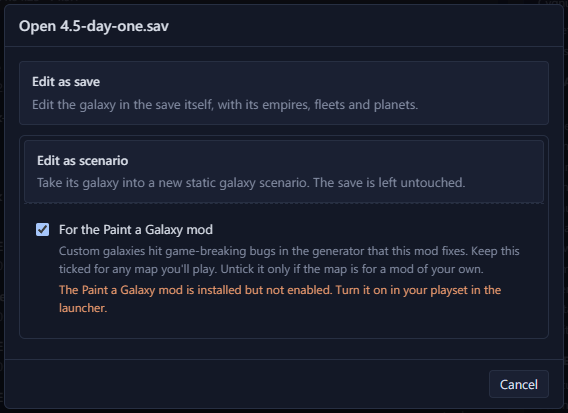
Enter or a double-click opens the selected row. For a save, Galaxy Forge first asks whether to "Edit as save" or "Edit as scenario". "Edit as scenario" starts a new scenario from the save's galaxy and leaves the save unchanged.
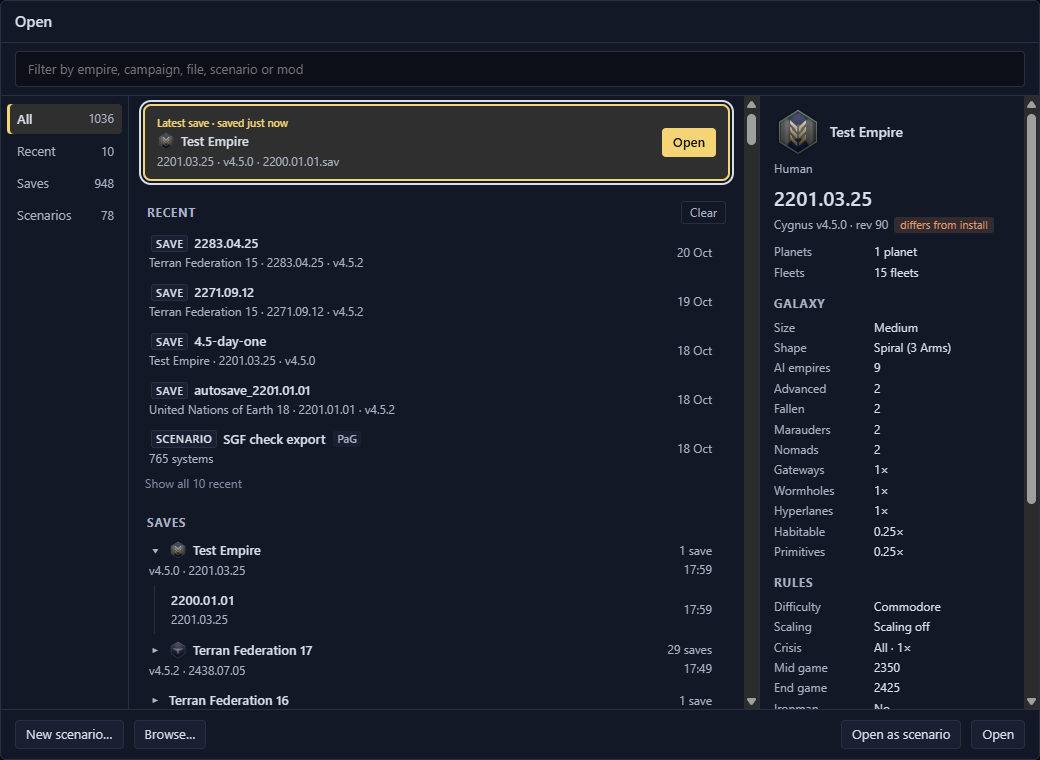
- 1Filter the list by empire, campaign, file, scenario or mod
- 2All, Recent, Saves and Scenarios tabs
- 3Saves grouped by campaign, newest first
- 4Details of the selected save
- 5New scenario… and Browse…
- 6Open as scenario, or Open
Reopen a recent file
The Recent list holds the last 10 files you opened. The All tab shows the 5 you opened most recently, and "Show all" switches to the Recent tab. Clear empties the list. Files that are no longer there are removed from it.
Open any other file
Click "Browse…" to pick a .sav file or a scenario .txt file. Once a document is open, Ctrl+O brings the list back.